
How to Format for Frictionless Check-In List for Security Guards
The Guard-Approved Guest List: How to Format for Frictionless Check-In
When planning a high-profile corporate gathering, an exclusive private event, or a secure venue activation, logistics managers rightly spend hundreds of hours perfecting the menu, the audiovisual production, and the layout. Yet, one critical operational element is routinely treated as an afterthought: the layout of the physical or digital guest list handed to the security detail.
A poorly formatted guest list is an immediate operational bottleneck. If a security officer has to squint, cross-reference nicknames, or hunt through dense blocks of tiny text under poor lighting, entry lines stall, guest satisfaction drops, and perimeter integrity is compromised. To ensure a seamless, secure, and professional check-in process, your guest list needs to be built with frontline tactical realities in mind.
- The Gold Standard: Real Names & Proper Casing (Ditch the Nicknames)
The single most common mistake event organizers make is exporting names exactly as guests typed them into a registration link. This frequently results in professional credentials or guest lists filled with names like “Skip,” “Trish,” “Bud,” or shortened family names. Additionally, careless data entry often leads to names being completely lowercase (e.g., “john smith”), which slows down visual scanning.
Always capitalize the first letter of both the first and last name. Proper capitalization creates a sharp visual anchor, allowing an officer’s eyes to lock onto a name immediately.
Furthermore, your security personnel do not know your guests personally. They cannot verify if the man holding an ID that reads “Richard J. Harrington” is the person listed on your sheet as “Richie Harrington”. To verify access authority rapidly and accurately, the name on the guest list must precisely match the legal name printed on the individual’s government-issued identification or driver’s license.
- Middle Initials: If you have a large attendee list or common names, include a middle initial to prevent confusion. If your list is smaller and the names are distinct, sticking strictly to the legal first and last name is perfectly acceptable.
Security Directive: Advise your attendees during the registration or RSVP phase that valid photo identification matching their registration name will be required at the perimeter. Instruct your database manager to scrub the final list, converting colloquial names back to formal, legal credentials.
- Strategic Organization: The Power of Alphabetical Last Names
Never sort your security list by first names or by the chronological order in which people RSVP’d. Your master list must be organized strictly in alphabetical order by last name.
Why prioritize the last name?
- ID Layout Matches: On almost every government-issued driver’s license or passport, the last name is positioned at the very top or prominently highlighted. Security guards are trained to read the last name first when verifying an identity.
- More Unique Identifiers: Last names are statistically far more unique than first names. If your list is sorted by first name, a guard checking in a “Michael” or “Sarah” might have to scroll through dozens of identical first names. Sorting by last name instantly narrows down the search space, drastically speeding up the entry line.
- Physical Execution: Basic Paper and Page Numbers
If your operations plan relies on physical clipboards, the actual physical paper and document assembly can make or break check-in efficiency.
- Stick to Basic, Standard Paper: Avoid glossy, heavy-cardstock, or colored paper stocks. Glossy paper reflects ambient light, creating a harsh glare under flashlights, overhead tents, or direct sunlight. Standard, matte white copy paper minimizes reflections and ensures optimal contrast with black ink.
- Mandatory Page Numbers (Page X of Y): If your guest list spans more than a single sheet, numbering the pages is critical. A sudden gust of wind, a dropped clipboard, or a quick flip to look up a name can easily disorganize your packet. Use a clear, large header or footer format like “Page 1 of 5,” “Page 2 of 5,” etc. This tells the guard instantly if a sheet is missing or out of order, preventing a scenario where a legitimate guest is turned away simply because “Page 3” slipped out of the stack.
- Legibility Rules: Font Size and Spatial Hierarchy
Check-in environments are rarely ideal. Security personnel are frequently working in dim ambient lighting, outdoor tents with glare, chaotic venue entryways, or nighttime environments relying on flashlights and clipboards. Under these conditions, standard 10-point or 12-point corporate fonts fail completely.
To ensure readability at a glance without forcing an officer to hold the page inches from their face, the body text of your list must utilize a font size of 16 points or higher.
Equally critical is the vertical spacing between names. Tight, single-spaced rows cause a phenomenon known as line-skipping, where an operator’s eye jumps from one line to the next while cross-referencing an ID. Your list should strictly employ a line spacing of 1.2 to 1.5. This deliberate vertical padding isolates each entry, giving the eye a clear, undisturbed path across the data points (Last Name, First Name, Affiliation, Access Level).
- Medium Matters: Paper vs. Screen Typography
The optimal font choices change drastically depending on whether your security gate is operating with physical paper clipboards or digital tablets (such as iPads or specialized event software). Using the wrong typeface category can significantly increase cognitive fatigue over a long shift.
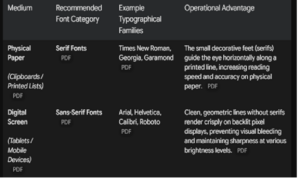
Operational Blueprint for Success
When you provide a clean, high-visibility, legal-name-compliant document to your frontline security staff, you eliminate guesswork. The guards can execute their verification protocol in seconds per guest, maintaining high throughput while ensuring that unauthorized personnel are efficiently turned away.
Pre-Event Checklist for Event Coordinators:
- [ ] Enforce legal name collection on all registration platforms.
- [ ] Capitalize the first letter of all first and last names.
- [ ] Sort the final sheet strictly alphabetically by Last Name.
- [ ] Include a middle initial for common names to ensure accurate matching.
- [ ] Print on basic matte paper to avoid flashlight and outdoor glare.
- [ ] Verify consecutive page numbers (e.g., “Page X of Y”) are clear on multi-page lists.
- [ ] Set body text formatting to minimum 16pt font.
- [ ] Adjust line spacing to 1.2 or 1.5 for clear row distinction.
- [ ] Select the proper font family: Georgia/Times New Roman for print, or Arial/Helvetica for tablets.
By treating your guest list layout as a security asset rather than an administrative chore, you protect your perimeter, support your security detail, and establish an immediate tone of professionalism the moment your guests arrive.
For an operational layout reference, you can review the formatting guide detailing these visual standards in the document “security_guest_list_best_practices. “.
Example guest list
MASTER GUEST LIST — EVENT ACCESS PERIMETER
A
- [ ] Anderson, Elizabeth M.
- [ ] Anderson, Elizabeth R.
- [ ] Arnold, David
B
- [ ] Baker, Robert
- [ ] Bennett, Katherine
- [ ] Brown, Matthew
C
- [ ] Carter, Amanda
- [ ] Clark, Jonathan
D
- [ ] Davis, Christopher
- [ ] Diazo, Elena
F
- [ ] Foster, Rebecca
G
- [ ] Garcia, Andrew
- [ ] Green, Megan
H
- [ ] Harris, Jessica
- [ ] Howard, Timothy
J
- [ ] Jackson, Mariel
- [ ] Jones, Daniel K.
- [ ] Jones, Daniel S.
- Page 1 of 2
MASTER GUEST LIST — EVENT ACCESS PERIMETER
L
- [ ] Lewis, Charles
- [ ] Lopez, Maria
M
- [ ] Martinez, Jose
- [ ] Miller, Stephanie
N
- [ ] Nelson, Patrick
O
- [ ] Otiz, Gabriella
P
- [ ] Parker, James
- [ ] Perkins, Douglas
S
- [ ] Sanchez, Sandra
- [ ] Smith, Brian A.
- [ ] Smith, Brian L.
T
- [ ] Taylor, Ashley
- [ ] Thomas, William
V
- [ ] Vance, Nicholas
W
- [ ] Walker, Kimberly
- [ ] White, Jeffrey
- [ ] Williams, Natasha
Here are some design templates for guest lists
https://inkpx.com/guest-list-template
Page 2 of 2
Other intersting Lists
6 Key Areas of Awareness for Security Professionals recognizing Autism