
Best Business Security Camera
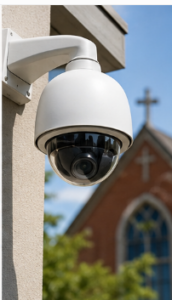
For most U.S. businesses, an NDAA-compliant PoE hybrid system combining a local NVR with selective cloud alerts delivers the best balance of forensic reliability, supply-chain safety, and total cost of ownership. Here are the top picks by use case:
- SMB retail or office (up to 16 cameras): Hanwha Vision IP cameras on a local NVR with cloud alert integration. Strong low-light performance, NDAA-compliant product lines, and straightforward PoE deployment.
- Multi-site or remote locations: Verkada or Eagle Eye Networks for cloud-managed video with centralized dashboards and no on-site server dependency.
- Enterprise or analytics-heavy environments: Avigilon (Motorola Solutions) for AI-driven analytics, license plate recognition, and large-scale NVR deployments.
- Industrial or rugged outdoor sites: Bosch Security cameras rated for harsh environments, with ONVIF compatibility for VMS flexibility.
- Executive protection support: Axis Communications for high-resolution, open-standards cameras that integrate cleanly with access control and alarm systems.
A site assessment that maps your risk zones to specific coverage goals is the single most important step before any purchase. Hubsecurityandinvestigativegroup can perform that assessment for your facility.
Table of Contents
- What are the best business security cameras by use case?
- How do you choose the right commercial surveillance system?
- How should you plan your camera deployment and network?

- Which camera brands fit your business profile?
- When should you hire a security integrator instead of buying direct?
- Key Takeaways
- Why site-assessment-led design is the only approach that holds up
- Hubsecurityandinvestigativegroup: professional security assessment and integrated protection
- Useful sources and further reading
What are the best business security cameras by use case?
| Best For | Deployment Model | Resolution | Analytics / AI | NDAA Compliant | Cost Shape | Install Complexity |
|---|---|---|---|---|---|---|
| SMB retail/office | Hybrid (NVR + cloud alerts) | 4MP/4K at entries | Motion, basic AI | Yes (Hanwha Vision) | Moderate capex + low opex | Low to moderate |
| Multi-site / remote | Cloud-managed | 1080p–4MP | Cloud analytics | Yes (Verkada, Eagle Eye) | Subscription (opex) | Low (no NVR) |
| Critical forensics | On-prem NVR | 4K at key zones | Advanced AI | Yes (Avigilon, Axis) | Higher capex, low opex | High |
| Industrial / outdoor | On-prem NVR or hybrid | 4MP/4K | Basic motion | Yes (Bosch Security) | Moderate capex | Moderate |
| Enterprise multi-site | Hybrid | 4K + 1080p mix | AI, LPR, facial | Yes (Axis, Avigilon) | High capex + opex | High |
Brand-to-use-case mapping:
- Axis Communications: Enterprise reliability, ONVIF open standards, and deep access-control integration. Best for organizations that need a proven ecosystem and long vendor support cycles.
- Hanwha Vision: Competitive low-light imaging and a strong NDAA-compliant product line. A practical choice for SMBs and mid-market retail.
- Avigilon (Motorola Solutions): Purpose-built for analytics-heavy enterprise deployments. Its Appearance Search and license plate recognition features are well suited to large campuses.
- Bosch Security: Rugged hardware with reliable outdoor performance. Preferred for warehouses, loading docks, and industrial perimeters.
- Verkada: Cloud-first architecture with a clean management portal. Reduces IT overhead for multi-site operators who lack dedicated security staff.
- Arlo: Accessible entry point for smaller businesses or hybrid DIY deployments. Best where budget constraints are real and camera counts stay low.
- Eagle Eye Networks: Cloud VMS-first platform with strong dealer support. Suited for franchise operators and property management companies managing many locations.
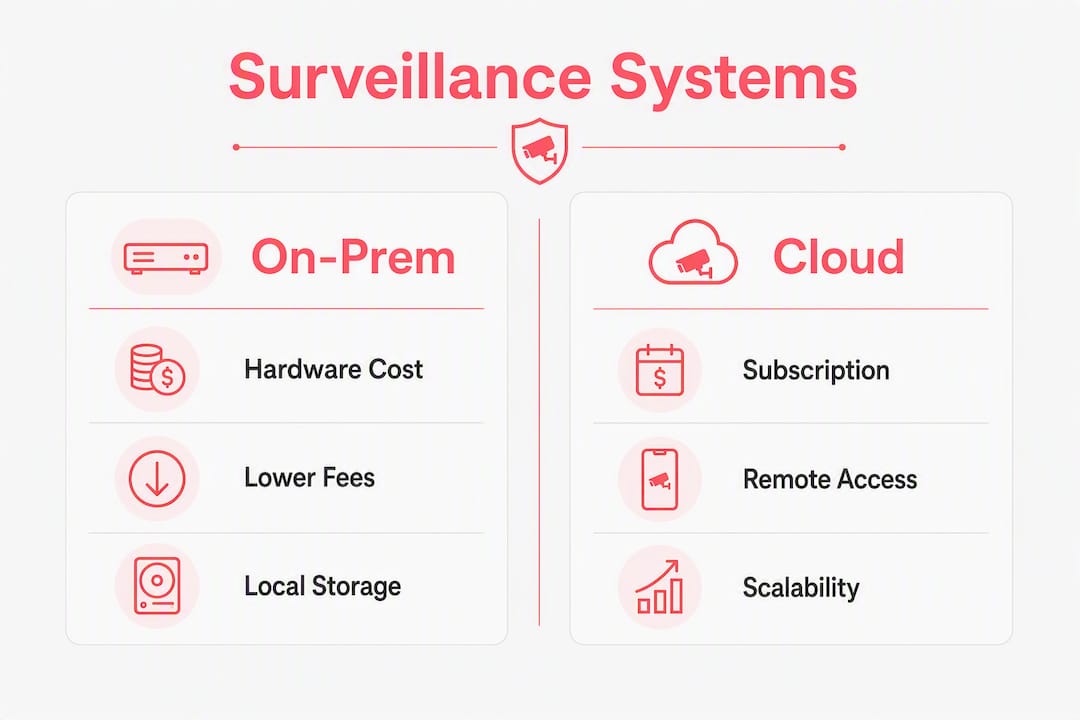
On total cost of ownership: on-prem NVR systems carry higher upfront hardware costs but lower ongoing fees. Cloud subscriptions shift cost to monthly opex, which suits growing businesses that want predictable budgets. Hybrid architectures reduce cloud subscription costs while preserving off-site redundancy and remote alerting.
How do you choose the right commercial surveillance system? Best Business Security in Woburn

Start with a documented site assessment before you talk to a single vendor. Map your facility into two zone types: identification zones (entries, cash registers, loading dock doors) where you need to recognize a face or read a plate, and detection zones (general aisles, parking areas) where you only need to confirm activity occurred. Allocating 4K cameras only to forensic zones and 1080p or 2MP elsewhere prevents network saturation and keeps storage costs manageable.
Selection criteria checklist:
- NDAA/supply-chain compliance. NDAA Section 889 bans certain suppliers for federal contractors and recipients of federal funds. Even if your business is not a federal contractor today, choosing compliant hardware protects you if that changes.
- Retention window and export capability. Business systems typically require extended retention periods and the ability to export footage in standard formats for insurance or legal use.
- Chain-of-custody support. The system must produce time-synced logs and exportable files that can be handed to law enforcement or an attorney without question.
- Analytics maturity. Match the feature set to your actual risk profile. Motion detection is sufficient for low-risk areas; AI-based loitering alerts or license plate recognition justify the cost only at high-value zones.
- Warranty and SLAs. Confirm hardware replacement timelines and whether the vendor provides firmware updates for the full product lifecycle.
- Power and backup. PoE switches and NVRs should be on UPS power to maintain recording during outages.
- Integration with existing systems. Confirm ONVIF or RTSP compatibility with your VMS, alarm panel, and access control platform.
Questions to ask vendors:
- Can you demonstrate a 4K clip export from the proposed NVR, playable in VLC or Windows Media Player, with accurate timestamps?
- What is your NDAA/TAA compliance documentation process, and can you provide it in writing?
- How are firmware updates delivered, and what is the end-of-support timeline for this product line?
- Does the system support network segmentation (camera VLAN) to isolate surveillance traffic?
- What does your maintenance agreement cover, and what is the guaranteed response time for a failed camera?
Red flags to watch for:
- Consumer-grade cameras (Wyze, Ring) positioned as business solutions without enterprise warranty or retention support.
- Vendors who cannot produce written NDAA compliance documentation.
- No local backup option — a pure cloud-only system with no NVR means total loss of footage if connectivity drops.
- Opaque supply-chain sourcing or OEM-relabeled hardware with unknown firmware origins.
- Proposals that skip a site walkthrough entirely and quote camera counts without a coverage map.
Pro Tip: Insist on plain-language acceptance criteria in the proposal. A concrete example: “The system shall export a 4K clip showing a recognizable face at the front counter, playable by standard media players, with accurate date/time overlay.” If a vendor cannot commit to that in writing, that is your answer.
How should you plan your camera deployment and network? Best Business Security in Woburn
Hybrid systems pair a local NVR for continuous high-resolution recording with cloud connectivity for remote alerts and off-site backup. On-prem NVR alone is appropriate when bandwidth is limited or data sovereignty is a concern. Pure cloud-managed systems work well for multi-site operators with reliable internet and no dedicated IT staff on site.
Bandwidth and storage reference (per camera, approximate):
| Resolution | Frame Rate | Bandwidth (Mbps) | — | — | — |
|---|---|---|---|---|---|
| 4MP | — | ~3 Mbps | — | — | — |
| 4K (8MP) | — | ~8 Mbps | — | — | — |
Figures assume H.265 compression. Actual storage varies with scene complexity and motion frequency.
Network planning notes: Size your PoE switch with at least 20% headroom above total camera load. Place cameras on a dedicated VLAN to isolate surveillance traffic from business operations. Apply QoS rules to prioritize NVR write traffic. Put both the NVR and PoE switches on UPS power with enough runtime to cover typical outage windows in your area.
Placement rules: Mount identification-zone cameras at 7–9 feet, angled to capture full facial features at the point of interest. Avoid backlighting (position cameras so subjects face the light source, not away from it). For outdoor perimeters, confirm IR illumination range matches the camera’s field of view at night.
U.S. federal law does not generally prohibit workplace video surveillance, but state laws vary widely. Many states require visible signage; some require written employee notice. Audio recording carries additional risk because several states require all-party consent. Disable audio recording unless your legal counsel has confirmed it is permissible in your state. Never place cameras in restrooms, locker rooms, or any space where a reasonable expectation of privacy exists.
For evidence handling: export footage in its native format with the original timestamp metadata intact. Document who accessed the footage, when, and why. That chain-of-custody record is what makes the footage usable in court or an insurance claim.
Which camera brands fit your business profile? Best Business Security in Woburn
Choosing a manufacturer is really a question of matching your operational constraints to a vendor’s strengths.
- Axis Communications leads on open standards and ecosystem depth. Its cameras support ONVIF Profile S and G, making them compatible with virtually any enterprise VMS. The trade-off is a premium price point.
- Hanwha Vision offers a compelling combination of low-light imaging and a verified NDAA-compliant product line. For SMBs that want enterprise-grade image quality without enterprise pricing, it is a strong default.
- Avigilon (Motorola Solutions) is purpose-built for analytics. Its Appearance Search feature lets operators search footage by clothing color or physical description, which is directly useful for post-incident investigations.
- Bosch Security excels in harsh environments. Its cameras carry wide operating temperature ranges and robust ingress protection ratings, making them the right call for warehouses, loading docks, and outdoor perimeters.
- Verkada simplifies multi-site management through a cloud-first architecture. There is no NVR to maintain, and the management portal is accessible from any browser. The subscription model means ongoing opex, so model that cost over a 5-year horizon before committing.
- Arlo is a practical entry point for smaller deployments. It supports hybrid local and cloud storage, and its setup complexity is low. For a business with fewer than eight cameras and limited IT support, it is a reasonable starting point.
- Eagle Eye Networks operates as a cloud VMS platform rather than a camera manufacturer. It works with a wide range of third-party cameras and is particularly well suited to franchise operators and property managers who need centralized oversight across many locations.
On NDAA compliance: procurement teams should require written documentation of NDAA/TAA compliance, firmware update paths, and spare-parts availability before signing any purchase order. Consumer-grade OEM equipment poses operational and insurance risks despite low upfront costs. For organizations with construction site security needs or temporary deployments, confirm that the chosen hardware supports rapid redeployment and that the VMS license is not tied to a fixed location.
For integration, confirm ONVIF or RTSP support when connecting cameras to an existing alarm panel or access control system. Most enterprise-grade cameras from the brands above support both protocols, but verify at the model level before purchasing.
When should you hire a security integrator instead of buying direct? Best Business Security in Woburn
Some projects genuinely exceed what an in-house team can manage well. The threshold is lower than most business owners expect.
Hire a professional integrator or security firm when your project involves any of the following: more than one physical location, forensic evidence requirements tied to active investigations, integration with access control or alarm systems, legally sensitive environments such as healthcare facilities, schools, or government contractors, or any situation where footage may need to serve as evidence in litigation.
A professional engagement should deliver a documented site assessment with a coverage map tied to specific identification and detection goals, a network design that accounts for bandwidth and storage, written acceptance tests for evidence export, a maintenance SLA, and user training for authorized staff. The project sequence typically runs: assessment, design, installation, commissioning, and handover. For an SMB project (8–16 cameras, single site), expect a timeline of two to four weeks from assessment to handover. Enterprise multi-site rollouts run longer depending on scope.
When evaluating integrators, request proof of state licensing, installer certifications (such as those from ASIS International or the Electronic Security Association), and current liability insurance. A vendor who cannot produce those documents on request is a risk, not a partner.
Hubsecurityandinvestigativegroup conducts paid site assessments that translate your business risk profile into a documented coverage plan with specific acceptance criteria. That assessment is the foundation of any camera system that will actually perform when you need it. See our guidance on hiring a security company for the full list of credentials and questions to ask.
This article provides general information about security camera selection and U.S. surveillance law. It is not legal advice. Confirm current state-specific requirements with a qualified attorney before deploying any monitoring system.
Key Takeaways Best Business Security in Woburn
The most effective business security camera strategy combines NDAA-compliant hardware, a documented site assessment, and a hybrid NVR-plus-cloud architecture that reserves 4K resolution for forensic identification zones only.
| Point | Details |
|---|---|
| Start with a site assessment | Map identification vs. detection zones before selecting any hardware or camera count. |
| Use hybrid architecture | A local NVR plus cloud alerts balances forensic retention, bandwidth, and off-site redundancy. |
| Reserve 4K for critical zones | Deploy 4K at entries and cash points; use 2MP or 4MP for general awareness areas to control storage costs. |
| Verify NDAA compliance in writing | Require documented NDAA/TAA compliance, firmware update paths, and spare-parts availability from every vendor. |
| Hubsecurityandinvestigativegroup | Offers paid site assessments and integrated security plans that translate risk goals into documented, testable coverage requirements. |
Why site-assessment-led design is the only approach that holds up Best Business Security in Woburn
Most businesses buy cameras the wrong way. They count cameras, compare megapixels, and pick the lowest bid. What they skip is the one step that determines whether the system actually works: a documented site assessment that connects camera placement to specific business risks.
We recommend hybrid architectures not because they are fashionable but because they solve a real operational problem. A local NVR keeps recording when your internet goes down. Cloud connectivity gives you remote alerting and off-site redundancy without doubling your storage hardware. Neither alone is as reliable as both together.
The NDAA compliance question is also more consequential than most buyers realize. It is not only about federal procurement law. It affects firmware updates, replacement parts, and your long-term security posture. An organization that builds its surveillance infrastructure on non-compliant hardware may find itself unable to get security patches or replacement units when a product line is discontinued. Best Business Security in Woburn
The brands covered here, Axis Communications, Hanwha Vision, Avigilon, Bosch Security, Verkada, Arlo, and Eagle Eye Networks, each have genuine strengths. None of them is the right answer for every site. The right answer comes from a risk-mapped assessment that specifies what each camera must actually show, not just where it points.
Hubsecurityandinvestigativegroup: professional security assessment and integrated protection
Hubsecurityandinvestigativegroup brings over seventy-five years of combined law enforcement and loss prevention expertise to every client engagement. For businesses that want more than a camera quote, we provide the full security layer: a documented assessment, a coverage plan tied to your actual risk profile, and the trained personnel to back it up.
Our services that complement a camera system: Best Business Security in Woburn
- Site security assessments: Documented risk mapping with identification and detection zone specifications and written acceptance criteria.
- Managed video evidence handling: Chain-of-custody documentation and footage export support for insurance claims and legal proceedings.
- Integrated security plans: Camera coverage coordinated with alarm systems, access control, and guard deployment.
- Armed and unarmed security guards: On-site personnel for commercial properties, retail environments, and sensitive workplace situations.
- Executive protection: Close-protection services for high-profile individuals, coordinated with facility camera coverage.
- Event security: Temporary camera and personnel deployment for live events and short-term engagements.
To request a paid site assessment or discuss an integrated security plan for your facility, contact Hubsecurityandinvestigativegroup through our building security services page.
Useful sources and further reading Best Business Security
The sources below are the primary references used in this article. We recommend them for deeper reading on U.S. surveillance law, NDAA procurement rules, and hybrid deployment guidance.
- CCTV Laws USA — Overview of federal and state video surveillance rules for businesses.
- Video Surveillance Laws by State — State-by-state breakdown of audio and video monitoring consent requirements.
- Best Security Cameras for Business 2026 — Tested review covering NDAA compliance, hybrid architectures, and top commercial camera picks.
- Business Security Camera Systems: NVR, Cloud, Hybrid Compared — Channel counts, retention windows, and PoE requirements for business deployments.
- NVR vs DVR: which system is right for your home? — Background on recording architecture differences useful for evaluating NVR-based business systems.
Recommended for Best Business Security
- The Ultimate Guide to Business Security: Protecting Your Assets, Employees, and Future – Hub Security & Investigative Group
- How Professional Security Guards Prevent Crime on Commercial Properties – Hub Security & Investigative Group
- How Professional Security Guards Prevent Crime on Commercial Properties – Hub Security & Investigative Group
- Best Business Security in Stoneham Ma
- Best Business Security in Melrose Ma
- Professional Security Guards Prevent Crime on Properties
Best Business Security
If you manage a commercial enterprise or a growing storefront in the thriving communities stretching up Interstate 93 north of Boston—from Medford, Woburn, and Andover all the way into New Hampshire—local safety is likely a top priority. As regional commerce expands, protecting your physical assets requires more than a generic off-the-shelf kit. Property owners need elite protection, which is why forward-thinking companies are looking to partner with Hub to deploy the Best Business Security Cameras on the market. Best Business Security in Woburn
The Unique Security Challenges North of Boston
The cities and business parks along the Route 93 corridor experience a unique blend of suburban growth and heavy commuter traffic. Whether you operate a logistics hub near the highway interchanges or a retail storefront on Main Street, local enterprises face distinct vulnerabilities.
To combat property crime, monitor daily logistics, and protect employee vehicles, installing the Best Business Security Cameras is no longer optional—it is a critical investment.
Why Hub is the Premier Choice for Commercial Surveillance
When local business owners search for a reliable security partner, Hub stands out from national conglomerates. Here is why hiring Hub to design your commercial infrastructure ensures you get the Best Business Security Cameras tailored to your specific operations: Best Business Security in Woburn
-
Customized Layout Design: Hub does not believe in one-size-fits-all packages. Their technicians evaluate your exact entry points, blind spots, and interior layouts to place the Best Business Security Cameras precisely where coverage matters most. Best Business Security in Woburn
-
Crystal-Clear HD and Night Vision: Grainy footage is useless when trying to identify intruders or license plates. Hub integrates enterprise-grade hardware that delivers ultra-high-definition resolution around the clock, cementing their reputation for providing the Best Business Security Cameras available. Best Business Security in Woburn
-
Seamless Cloud & Local Integration: Access your live feeds and archived recordings remotely from any mobile device or desktop. Hub configures resilient local backups paired with secure cloud storage, making them a leader in delivering the Best Business Security Cameras. Best Business Security in Woburn
-
Scalability for Growing Enterprises: Whether you run a single warehouse or a chain of regional offices up the I-93 corridor, Hub builds modular systems that grow seamlessly with your company. Best Business Security in Woburn
Maximizing ROI with Smart Surveillance Integration
Investing in top-tier security yields benefits far beyond simple loss prevention. Modern analytics built into these systems can help track customer foot traffic, optimize employee workflows, and reduce liability risks from slip-and-fall incidents. By choosing a specialized provider like Hub, you ensure that every dollar spent on the Best Business Security Cameras directly improves your bottom line and operational efficiency. Best Business Security in Woburn
Final Verdict: Secure Your Enterprise Today for Best Business Security
Best Business Security you need the Best Business Security Camera’s.
Local competition is fierce, and safeguarding your commercial investment is paramount. Businesses located north of Boston cannot afford to compromise when it comes to safety and asset tracking.
For unmatched engineering, professional installation, and ongoing technical support, look no further than Hub. Upgrade your commercial defense strategy today and experience peace of mind with the Best Business Security Cameras designed specifically for your enterprise needs. Best Business Security in Woburn Best Business Security in Woburn
Driving with Scottman895: I-93 North (Boston, Massachusetts)
This video provides a scenic, real-time drive along the I-93 North corridor, showcasing the exact Massachusetts regions and bustling best business security landscapes discussed in this review.