
HIPAA requires four physical safeguards under 45 CFR §164.310: facility access controls, workstation use, workstation security, and device and media controls. Each standard carries implementation specifications that are either required or addressable, and every addressable decision needs a documented, risk-based rationale. Physical safeguards don’t stand alone. They work only when tied to your organization’s broader HIPAA security program and its risk analysis.
TL;DR:
- Documentation of risk-based justifications is critical when deviating from addressable physical safeguard specifications.
- Regularly updating and reviewing facility access and maintenance logs for at least six years helps ensure audit readiness.
- Implementing device encryption, strict badge deactivation procedures, and clear security zone definitions are among the most effective quick fixes.
- Physical controls like asset tracking, environmental monitoring, and portable device encryption directly reduce breach risks from lost or stolen hardware.
- Assigning specific owners and establishing a routine review cadence for physical safeguards strengthens overall compliance and breach prevention efforts.
Table of Contents
- How Physical Safeguards Fit Into the Security Rule
- Facility Access Controls: Contingency Operations, Security Plans, and Access Validation
- Workstation Use Policy: Permitted Functions and Session Controls
- Workstation Security: Physical Protections Against Theft and Tampering
- Device and Media Controls: Disposal, Reuse, and Chain of Custody
- Turning Addressable Decisions Into Audit-Ready Evidence
- Implementation Checklist: Priorities, Owners, and Review Cadence
- Applied Field Examples From Security and Investigative Groups
- An Editorial Take on What Compliance Officers Should Fix First
- Protecting Your Facility Starts With the Right Partner
- Sources
How Physical Safeguards Fit Into the Security Rule
The Security Rule asks covered entities and business associates to implement “reasonable and appropriate” administrative, physical, and technical safeguards for electronic protected health information, according to HHS’s summary of the Security Rule. Physical safeguards are the tangible layer of that requirement: locks, badges, cable ties, sign-in sheets, and disposal logs, rather than passwords or firewalls.
The four standards under 45 CFR §164.310 break down like this:
- Facility access controls — limit physical entry to the areas where ePHI systems live.
- Workstation use — govern how staff interact with the devices that display or process ePHI.
- Workstation security — protect the physical hardware itself from theft or tampering.
- Device and media controls — manage the full lifecycle of the hardware and storage media that carry ePHI, from deployment through disposal.
Each standard has implementation specifications labeled either required or addressable. Required means you implement it, full stop. Addressable means you assess whether the specification is reasonable and appropriate for your environment. If you decide not to implement it as written, you document why and describe the equivalent alternative measure you’re using instead. Skipping that documentation is the most common finding OCR investigators cite.
None of this happens in isolation. A facility security plan without a documented risk analysis behind it is just a policy binder. Physical safeguards work when they trace back to specific threats your risk assessment identified, whether that’s an unlocked server closet, a shared workstation in a waiting room, or a laptop that leaves the building every night.
Facility Access Controls: Contingency Operations, Security Plans, and Access Validation
Facility access controls address who can physically get near the systems and files that hold ePHI, and OCR treats this standard as foundational rather than optional. The August 2024 OCR cybersecurity newsletter noted that lost or stolen devices contributed to a significant number of large breach reports between 2020 and 2023, and pointed directly at weak facility access controls as a contributing factor in many of them.
The standard has four implementation specifications, and they build a coherent picture of how a facility should behave under normal operations and under stress.
- Contingency operations. This addressable spec covers how authorized staff get into the building and access ePHI during an emergency, power outage, or disaster recovery event. A workable version includes an emergency badge list held by two or three designated people, a call-down roster for after-hours access requests, and a documented process for granting temporary access when the normal badge system is down.
- Facility security plan. This required companion piece documents how the facility protects itself and its equipment from unauthorized physical access, tampering, and theft. For a single-site clinic, this might be a short document describing perimeter locks, camera coverage, and after-hours alarm monitoring. For a hospital with leased office space or shared common areas, the plan needs to address which zones are shared with other tenants and how ePHI areas stay separated from public traffic.
- Access control and validation procedures. This addressable spec governs how you confirm a person’s authority to be in a given space, based on role, function, or visitor status. Badge lifecycle management belongs here: provisioning on hire, role changes on transfer, and immediate deactivation on termination. Visitor management belongs here too, along with escorted-vendor procedures for anyone entering server rooms or medical records storage without standing authorization.
- Maintenance records. This addressable spec asks you to document repairs and modifications to physical security components, locks, walls, doors, and hardware. Keep records of when a lock was rekeyed, when a badge reader was replaced, and when a door alarm was serviced. These records matter more than most compliance officers expect during an actual incident investigation, since they establish whether a physical control was working on the date in question.
Pro Tip: Keep maintenance and access logs for at least six years to match HIPAA’s documentation retention rule, and store them somewhere separate from the systems they describe. A breach investigation that needs your badge logs shouldn’t depend on the same server that got compromised.
Facilities with layered tenancy, shared elevators, or mixed-use buildings need more granular zone mapping than a standalone clinic. Medical facility security planning that accounts for shared-space realities tends to hold up better under audit than a generic template borrowed from a single-tenant building.
Workstation Use Policy: Permitted Functions and Session Controls
Workstation use, under §164.310(b), governs the functions performed at a device, not the device itself. That distinction trips up a lot of compliance programs that jump straight to hardware controls without defining acceptable behavior first.
A workable workstation use policy addresses several things at once:
- Permitted functions by workstation class. A front-desk check-in terminal doesn’t need the same access as a billing workstation or a clinical documentation terminal. Define what each class can do and restrict everything else.
- Screen siting and privacy. Monitors displaying ePHI shouldn’t face waiting rooms, hallways, or windows visible from outside. Privacy filters help where repositioning isn’t practical.
- Session timeouts. A common benchmark is an automatic screen lock after 2 to 5 minutes of inactivity on shared or public-facing terminals, with longer windows acceptable on workstations in controlled clinical areas. Forced logout at shift change is worth enforcing on any shared device.
- Remote and telework workstations. OCR guidance and industry practice make clear that a home office accessing ePHI carries the same obligations as an on-site workstation, adapted to the environment: private screen placement away from household traffic, locked storage for any printed material, and the same session timeout standards.
Policy language only works if someone checks it. Spot audits of screen orientation and timeout settings, done quarterly, catch drift long before an OCR investigator does.
Workstation Security: Physical Protections Against Theft and Tampering
Where workstation use governs behavior, workstation security governs hardware. This standard asks what stops someone from walking off with a laptop or plugging an unauthorized drive into a nursing station computer.
Practical controls fall into a few categories:
- Physical restraint. Cable locks on desktop towers, lockable docking stations for laptops that stay at a fixed station, and locked doors on any room housing a server or network closet.
- Asset tracking. Every device that touches ePHI should carry an asset tag tied to an inventory system, with tamper-evident seals on devices at higher risk of unauthorized access, like shared workstations in public areas.
- Environmental and surveillance controls. Server closets need controlled access and, in most cases, camera coverage of the entry point. Climate control matters here too, since server rooms that overheat fail in ways that create their own availability problems.
- Portable device rules. Laptops and tablets that leave the building need full-disk encryption, a documented sign-out process, and specific rules for transport, such as never leaving a device unattended in a vehicle.
None of these controls are exotic or expensive. A $30 cable lock and a documented sign-out sheet close a surprising number of gaps that show up in breach reports.
Device and Media Controls: Disposal, Reuse, and Chain of Custody
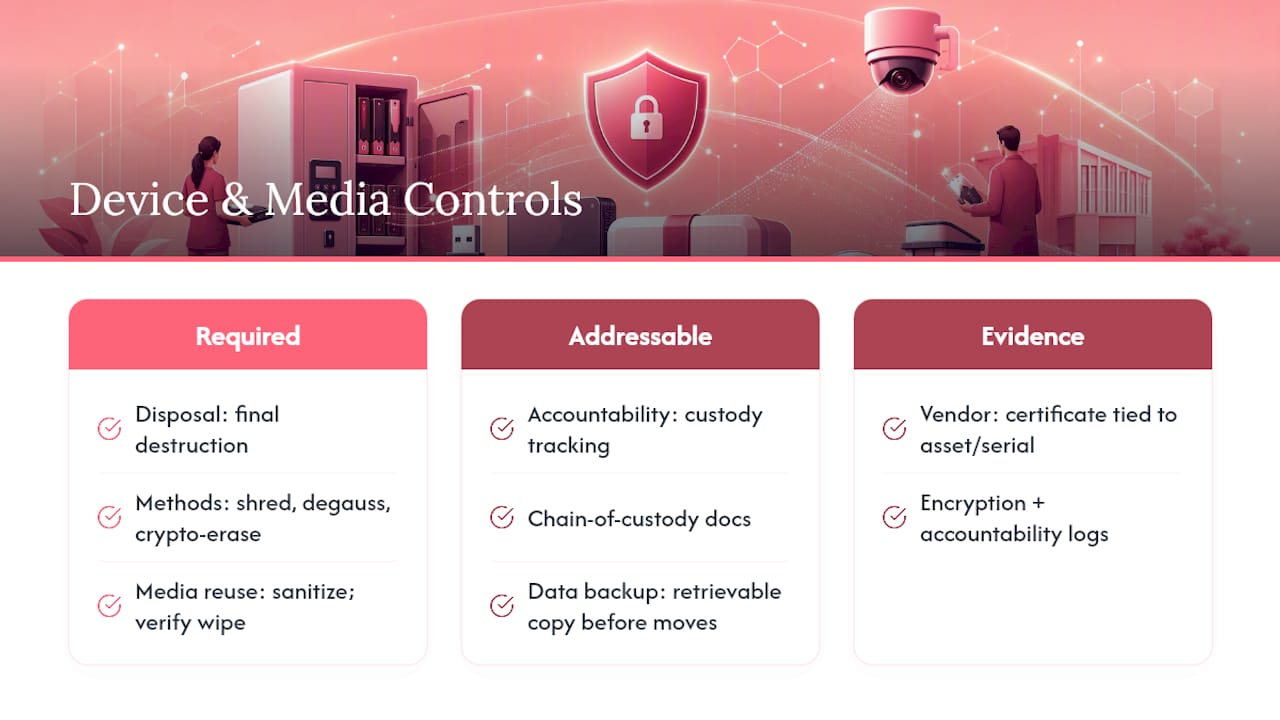
Device and media controls, under §164.310(d), cover the full lifecycle of hardware and storage media, from deployment to destruction. This is where required and addressable specifications split most clearly.
Disposal and media reuse are both required specifications. Disposal means final destruction of the media so ePHI can never be reconstructed. Accepted methods include physical destruction (shredding, degaussing) and, for solid-state drives, crypto-erase performed and verified according to methods consistent with NIST SP 800-88 media sanitization guidance. Media reuse means sanitizing a drive before it’s redeployed to a different workstation or user, with verification that the wipe actually completed rather than just initiated.
Accountability and data backup and storage are addressable specifications, which doesn’t make them optional in practice for most healthcare organizations. Accountability means tracking who has custody of hardware and media at every stage: sign-out logs when a laptop leaves a department, chain-of-custody documentation when a drive moves from a decommissioned workstation to a disposal vendor, and an assigned responsible party for each stage of that chain. Data backup and storage means creating a retrievable, exact copy of ePHI before equipment is moved or serviced, so a hardware failure during a facility move doesn’t become a data loss event.
Vendor documentation matters as much as internal process. A certificate of destruction from a vetted disposal vendor, tied to the specific asset tag and drive serial number, is the piece of evidence OCR investigators ask for first when a decommissioned device turns up unaccounted for.
Lost and stolen devices remain one of the most persistent sources of large HIPAA breaches, a pattern OCR flagged again in its August 2024 cybersecurity newsletter covering breach reports from 2020 through 2023. Encryption on portable devices, paired with tight accountability logs, closes most of that exposure even when a device physically disappears.
Turning Addressable Decisions Into Audit-Ready Evidence
The gap between a policy that sounds good and one that survives an audit almost always comes down to documentation of addressable decisions. When you decide not to implement an addressable specification exactly as written, the record needs to show your reasoning, not just your conclusion.
- Document the assessment itself. State what the specification asks for, what your facility’s risk profile looks like, and why the standard approach either fits or doesn’t. If a small satellite clinic decides badge readers aren’t proportionate to its risk level compared to a keyed lock with a strict key-holder list, write that reasoning down before an auditor asks for it.
- Record the alternative measure. If you’re not implementing the specification as written, describe exactly what you’re doing instead, and tie it back to the same protective goal.
- Assemble the standing evidence file. Auditors typically expect to see a facility security plan, zone maps showing restricted versus public areas, access logs covering a representative period, maintenance records for locks and alarms, and destruction certificates for disposed media.
- Set a review cadence tied to your risk analysis. Annual review is a reasonable floor for most organizations, with faster remediation cycles, often 30 to 90 days, for any finding that maps to a known high-risk gap identified in your physical security risk assessment.
Skipping step one is the single most common documentation failure compliance officers run into. It’s not enough to have made a reasonable decision. You have to be able to produce the paper trail showing you actually made it.
Implementation Checklist: Priorities, Owners, and Review Cadence
| Task | Owner | Frequency | Verification |
|---|---|---|---|
| Inventory all devices touching ePHI | IT | Quarterly | Spot check against asset tags |
| Enable auto-lock and session timeouts | IT | At deployment, audited quarterly | Sample workstation checks |
| Encrypt all portable devices | IT | At deployment | Encryption status report |
| Create or update facility security plan | Compliance | Annually | Document review and sign-off |
| Log maintenance, repairs, and destruction events | Facilities/Vendor | Ongoing | Random log audit |
| Audit badge access and visitor logs | Compliance | Monthly | Badge audit against staff roster |
Assign a single named owner per task, not a department. “IT” without a name attached is how remediation items sit open for a year.
Applied Field Examples From Security and Investigative Groups
Some experienced security and investigative groups bring significant combined law enforcement and loss prevention experience to healthcare facility security work, and the patterns that matter most are consistent across sites: visitor management paired with active guard patrols, camera placement that actually covers ePHI storage and server areas rather than just entrances, and escort procedures for vendors working near records rooms or IT closets.
When contracting for physical security support, ask any vendor, security or otherwise, for a written scope of work covering exactly what areas they patrol, and request certificates of destruction for any media they help retire. Verifying vendor credentials before granting access, including background screening on security personnel, closes a gap that a facility security plan on paper doesn’t cover by itself.
An Editorial Take on What Compliance Officers Should Fix First
OCR’s own language in its 2024 guidance is telling: physical security is not a “check-the-box” exercise. That framing matters because most physical safeguard programs I’ve seen described treat §164.310 exactly like a checklist, implementing each item in isolation without asking whether the controls actually address the facility’s real risk profile.
The three quickest wins for most healthcare organizations this quarter are device encryption on every portable unit, a documented badge deactivation process tied directly to HR termination workflows, and a written facility security plan that names actual zones instead of describing generic “restricted areas.” None of these require large budgets. All three require someone to own the follow-through.
Build a prioritized remediation plan tied to your risk analysis, not a wish list. A physical safeguard that isn’t documented is, for audit purposes, indistinguishable from one that was never implemented.
— Derek
Protecting Your Facility Starts With the Right Partner
Physical safeguards work best when they’re built into daily operations, not bolted on before an audit. Hub Investigative Group brings decades of combined law enforcement and loss prevention experience to healthcare facility security, supporting the visitor management, patrol coverage, and vendor escort procedures that reinforce your §164.310 compliance program. If your facility needs a security partner who understands both the physical risk and the compliance stakes behind it, explore Hub’s security services to talk through what your site actually needs.
This article is general information, not a substitute for advice from a qualified lawyer. Consult a qualified legal professional about your own circumstances before acting on anything here.
Sources
- 45 CFR §164.310 (Physical safeguards)
- OCR cybersecurity newsletter — August 2024
- Summary of the HIPAA Security Rule — HHS
- Govinfo